Follow me

Showing posts with label Windows Phone Applications. Show all posts

Location Hacker for Facebook


Now application is working fine. We have fixed error. If you are updating this application, then you need to remove older version from your Phone and then Install this version, otherwise this application will not work on your Phone.

With your smart phones you can check-in your nearest places and show it on Facebook. No phone allow you to check-in on that place where you're not. For example if you're in Moscow (Russia) and you want to show your Facebook friends that you're in Bannock (Thailand) then this was not easily possible. But now you can do this from your Windows Phone 8. You can do this easily with Location Hacker. This application is available for Windows Phone 8 and Windows Phone 8.1 only.

Con sus teléfonos se puede comprobar en sus lugares más cercanos y mostrar que en Facebook. No hay teléfono le permite el check-in en ese lugar donde no lo estás. Por ejemplo, si estás en Moscú (Rusia) y quiere mostrar a sus amigos de Facebook que estás en Bannock (Tailandia), entonces esto no era fácilmente posible. Pero ahora usted puede hacer esto desde su Windows Phone 8. Usted puede hacer esto fácilmente con Location Hacker. Esta aplicación está disponible para Windows Phone 8 y Windows Phone 8.1 sólo 


Features/Características

Check-in on any part of world
Tag friends in check in (optional)
Add your message is check in (optional)

Entrada en cualquier parte del mundo 
Tag amigos en el registro (opcional) 
Añada su mensaje es el registro de entrada (opcional)


System requirements/requisitos del sistema

You can install this application in any Windows Phone 8 and  Windows Phone 8.1 device. You should have a valid Microsoft account registered in your Windows Phone. You should have a Facebook account. No another requirement is required. (Note this application is currently not available in China). This application is available in English and Spanish only.

Puede instalar esta aplicación en cualquier equipo con Windows Phone 8 y Windows Phone 8.1 dispositivo. Usted debe tener una cuenta de Microsoft válida registrada en su Windows Phone. Usted debe tener una cuenta de Facebook. No se requiere ningún otro requisito. (Tenga en cuenta esta aplicación no está disponible en China). Esta aplicación está disponible en Inglés y en español.


Link for Download/Enlace para Descargar

You can download this from here
Puede descargarlo desde aquí


Or scan this QR Code/O escanee este código QR


Important/importante

This application is developed in C#.NET. So due to some limitations of Facebook SDK for C# there you need to keep in mind few things.
  • You can login this application only with one account. You can logout any time, but next time when you will login again then it will not ask you to enter your login details again, It will automatically login after press login button.
  • If you will change your facebook password then you need to enter your new login details in this application.
  • This application use token method. Token expire after every 60 days. So you have need to again type your facebook login id and password after every 60 days.
  • Currently version 1.0.1.109 is released. So be patient. Let every page and element properly before click on any control of any page. If your internet connection is slow then it can take longer time to load objects on pages.
Esta aplicación está desarrollada en C #. NET. Así que debido a algunas limitaciones de Facebook SDK para C # no es necesario mantener en mente algunas cosas. 


  • Puede entrar en esta aplicación única con una sola cuenta. Puede desconectarse en cualquier momento, pero la próxima vez que se acceda de nuevo, entonces no le pedirá que introduzca sus datos de acceso de nuevo, será iniciar sesión automáticamente después de pulsar el botón de inicio de sesión. 
  • Si usted va a cambiar su contraseña de facebook, entonces usted necesita para introducir nuevos datos de acceso en esta aplicación. 
  • Esta aplicación utiliza el método token. Token expirar después cada 60 días. Así que usted tiene necesidad de escribir de nuevo su facebook Identificación del usuario y la contraseña después de cada 60 días. 
  • Actualmente la versión 1.0.1.109 se libera. Así que tenga paciencia. Deje que cada página y el elemento correctamente antes de hacer clic en cualquier control de cualquier página. Si su conexión a Internet es lenta, entonces puede tomar más tiempo para cargar objetos en las páginas.


How to use/Cómo utilizar

Make sure that your phone have internet connection (we recommend fast internet connection). Open application. Click on log in button.

Asegúrese de que su teléfono tiene conexión a Internet (se recomienda conexión de internet rápida). Aplicación Open. Haga clic en botón Iniciar sesión.


It will take few seconds for load login page. Type your login details and click on log in button. Tomará unos segundos para que la página de acceso de carga. Escriba sus datos de inicio de sesión y haga clic en el registro en el botón.


Now it will ask for receive your facebook profile details. You must click on ok button else this application will not work. Ahora se le preguntará para recibir los datos de su perfil de Facebook. Debe hacer clic en el botón ok cosa esta aplicación no funcionará.


After it will ask permission for publish post by this application. Make sure you have selected it to public or friends. Don't choose only me. Because if you will choose only me, then your friends will not be able to see your check in which will be posted by this application.
Después se le pedirá permiso para publicar mensaje por esta aplicación. Asegúrese de que ha seleccionado la pública o con amigos. No elija sólo a mí. Porque si usted va a elegir sólo a mí, entonces tus amigos no podrán ver a su registro, que será publicado por esta aplicación.

Now it will show your Facebook profile picture your name on this application and all button will be enabled in this application. Click on Show Map button.
Ahora va a mostrar su foto de perfil de Facebook de su nombre en esta solicitud y todos los botones se activará en esta aplicación. Haga clic en el botón Ver mapa.


Here it will display world map. You can scroll map. zoom slowly to that area which you want to select.
Aquí se mostrará el mapa del mundo. Puede desplazarse mapa. reduzca lentamente a esa área que desea seleccionar.


It will take some time to load places (time depends on internet connection, If you will have saved that maps in your device then it will load immediately) Leave zoom from where you want to scan places for pick and click on Select button. Now it will scan for places which are available in that area. (It will take few seconds for get list of nearest places). After it select place which you want.
Tomará algún tiempo para cargar los lugares (el tiempo depende de la conexión a internet, si usted se habrá ahorrado que los mapas en su dispositivo, entonces se cargarán inmediatamente) Deja zoom desde la que desea escanear lugares para elegir y hacer clic en el botón Seleccionar. Ahora buscará los lugares que están disponibles en esa área. (Tardará unos segundos en la lista get de lugares más cercanos). Después de que se seleccione el lugar que desee.


Click on Select button. Haga clic en el botón Seleccionar.

Now it will return to home screen of this application. Now here you will see that your selected place is showing. Now if you want to tag your friends or Include message in checkin then you can are do that by clicking Tag friends and Include a msg button. These are optional.
Ahora volverá a la pantalla principal de la aplicación. Ahora aquí se verá que su lugar seleccionado está mostrando. Ahora bien, si usted quiere etiquetar a tus amigos o Incluir mensaje en el registro, entonces usted puede hacer es que al hacer clic amigos etiqueta e incluir un botón de mensaje. Estos son opcionales.


Finally press Check in button. and wait for few seconds, Now it will show message like following.
Por último, pulse en el botón Registrar. y esperar unos segundos, ahora se mostrará mensaje como siguiendo.


Congratulation. You have completed tutorial. Now you can fun with this application. Enhorabuena. Ha completado tutorial. Ahora usted puede divertirse con esta aplicación.


We respect your privacy we will never share your personal information with anybody. Our application is completely secure.


If you like my work, then you can buy me beer(s)

Beer price list


The Barcode RW


With this application you can scan almost any kind of barcode and in this version you can generate 5 kinds of barcode. You have no need to internet connection on your phone. This application have no need of internet connection, it works in offline mode. :)

What is barcode

A barcode is an optical machine-readable representation of data relating to the object to which it is attached. Originally barcodes systematically represented data by varying the widths and spacings of parallel lines, and may be referred to as linear or one-dimensional (1D). Later they evolved into rectangles, dots, hexagons and other geometric patterns in two dimensions (2D). Although 2D systems use a variety of symbols, they are generally referred to as barcodes as well. Barcodes originally were scanned by special optical scanners called barcode readers.

How to use this application

In main page you will find the same screen which is showing here. If you want to scan a barcode then press Scan Code button. It will open a new page.

Here camera will start, you need to hold your phone over any barcode and wait for few seconds, It will automatically focus (if not do it manually by pressing the camera focus key) and when it will read information then phone will vibrate. You can also copy that information by pressing the Copy button.

If you want to make your own barcode then click on Generate Code button in main page. It will open this page.


Here in left side you can select barcode type, In textbox type information which you want to add in barcode. Now click on Generate button. It will generate a barcode and it will save that image in saved pictures folder in your phone. (It will save only if Save generated Barcode checkbox will be checked).


This application is available for Windows Phone only. You can download it from marketplace.
Click here for download. Or scan QR code:


Dictionaries for Windows Phone

Currently we have developed 3 Dictionaries 

Hindi Dictionary
This dictionary will allow you to translate English word(s) to Hindi. This is free application. You can download this application from here


Functions of all Buttons/Checkboxes
Find: after type word in textbox it will give you list of all matching words, if you will left textbox blank then after press this button it will show list of all available word in this dictionary.
Clear: it will clear value of textbox.
Rate app: if you want to give rating of this application then press this button and choose stars form 1 to 5, if you hate this application then give 1 star, if you like this application then you can give 5 star and you can also write you review there, your feedback is important for me.
About: It will give information about this application.
Only show matching words from starting: If you will unmark this checkbox then if you search any word then it will also show you that words which are also matching from middle, for example if you Search friend then it will also show you girlfriend, because girlfriend word contain friend. If you don't want enable this feature then mark this checkbox.


English - Spanish Dictionary
This application will allow you to convert English words to Spanish and Spanish words into English.
Latest version of this dictionary is 1.0.0.1


You can download this application from here

How to use
First select language in which you want to search, If you want to search meaning of English word then select English to Spanish if you want to search meaning of Spanish word then select Spanish to English.
Functions of all Buttons/Checkboxes
Find: after type word in textbox it will give you list of all matching words, if you will left textbox blank then after press this button it will show list of all available word in this dictionary.
Clear: it will clear value of textbox.
Rate app: if you want to give rating of this application then press this button and choose stars form 1 to 5, if you hate this application then give 1 star, if you like this application then you can give 5 star and you can also write you review there, your feedback is important for me.
About: It will give information about this application.
Only show matching words from starting: If you will unmark this checkbox then if you search any word then it will also show you that words which are also matching from middle, for example if you Search friend then it will also show you girlfriend, because girlfriend word contain friend. If you don't want enable this feature then mark this checkbox.
Filter search: If you think that it give some unwanted words in list then you can check this checkbox.
Copy: If you want to copy meaning of any word then after find that word just press this button, it will copy that in clipboard, then you can paste it anywhere.


English - French Dictionary
This application will allow you to convert English words to French and French words into English.


You can download this application from here

How to use
First select language in which you want to search, If you want to search meaning of English word then select English to French if you want to search meaning of Spanish word then select French to English.
Functions of all Buttons/Checkboxes
Find: after type word in textbox it will give you list of all matching words, if you will left textbox blank then after press this button it will show list of all available word in this dictionary.
Clear: it will clear value of textbox.
Rate app: if you want to give rating of this application then press this button and choose stars form 1 to 5, if you hate this application then give 1 star, if you like this application then you can give 5 star and you can also write you review there, your feedback is important for me.
About: It will give information about this application.
Only show matching words from starting: If you will unmark this checkbox then if you search any word then it will also show you that words which are also matching from middle, for example if you Search friend then it will also show you girlfriend, because girlfriend word contain friend. If you don't want enable this feature then mark this checkbox.
Filter search: If you think that it give some unwanted words in list then you can check this checkbox.
Copy: If you want to copy meaning of any word then after find that word just press this button, it will copy that in clipboard, then you can paste it anywhere.


Custom devices list


Palm: 7081486362
Sidekick: 21810043296
Sony Ericsson: 38125372145
iPad: 112930718741625
Foursquare: 86734274142
Telegram: 140881489259157
Carrier Pigeon: 130263630347328
Morse Code: 134929696530963
Message in a Bottle: 123903037653697
Commodore 64: 138114659547999
Your moms computer: 132386310127809
TRS-80: 134998549862981
K.I.T.T.: 129904140378622
Mind Computer Interface: 121111184600360
eyePhone: 110455835670222
toaster: 203192803063920
microwave: 0a5266c8844a1b09211e7eb38242ac2f
Super Nintendo Entertainment System: 235703126457431
Gameboy Color: 180700501993189
GoD: 256591344357588
Glade Air Freshner: 4aeb4db2e8df1cdb7f952b2269afb560
Strawberry: a4c9fb1708a848c2241674531176209b
The moon: 221826277855257
Dr. Pepper: eea90d40e1d12565695dbbbdbd5e965b
Nintendo wii: 243870508973644
Alcohol: 250335888312118
Cheese: 218791271497130
iPod Nano: 142039005875499
Nintendo 64: 236264753062118
Microsoft Excel: 242740155751069
Linux Ubuntu: 220593361311050
My Bedroom: 174811032586879
Your Mums Bedroom: 5f64bbc9ac2f12b983200925da461322
Lamp: 230755826955133
Refrigerator: 250828364944350
A potato: 127926427295267
Vibrator: eb4c6d1a60e19a7795da501e1f468035
Sperm Whale: 170318539700306
Pogo Stick: 185103391549701
Banana Phone: 1477a4cd29ec724a3de19be5d26e0389
Google+: 4d8243dbb7064f88351fe6c809582320
The Future: 108372819220732
Smoke Signal: 134138923334682
tin cans connected by string: 242191299125647
Pokedex: de3da265cf6976745bb1d60a8c198151
Telepathy: ea01a57edb26cf1de143f09d45cfa913
Typewriter: d3d554bf60297cb2c384e3d7cf5a066d
Harry Potter: b8ebeb983f45eaa0bd5f4f66cad97654
TARDIS: 200439256674396
Pip Boy: 142806259133078
Mind Control: 1dc633368924b3b0b4d08e3f83230760
Jedi Mind Control: 240597869302110
Telekinesis: 224139600960217
Post-It Note: 115227201900831
GLaDOS: 246126362083515
Ansible: 185474028180003
W.O.P.R: 228373497202865
Airwolf: 123944137696757
HMCS Belafonte: 222345601140304
Hogwarts: 2dc1d3004dbc4a67c4b552be3c25ccb0
Stephen Hawking's Wheelchair: 129985073756521
Head Antenna: 221107014598348
UPS: 258012620879655
Fedex: 232029733497914
Raven from King's Landing: 193094050743722
Harbinger of Doom: 180354375362451
Mind Meld: 186993071361881
Unspeakable Ritual: 174903625908095
A Van down by the River: 119883641439994
Pony Express: 186359518090057
Sub-Etha: 120168391409358
Myspace: 119920871434786
Friendster: 247310815280913
Zombocom: 195518590504787
Postcard: 213487932030106
Toilet: 173687282696461
Minecraft: 231623746870852
Accident: 211312955581644
Mystery Machine: 259314457416472
Magic: 181277448602956
Hell: 148841558523990
The afterlife: 220816157954138
Heaven: 245437548809330
The Event Horizon: 119999311425820
The Laughing Man: 222077737828487
The Lexx: 123356437754169
Microsoft Zune: 23244056678669
NOKIA 5110 limited edition: 57e9e9cf7b70a4c22ef3e3c14b773ad0
Faсebook for Nokia 5110™: d8894b60d616afaae688eed90dbecb1c
NOKIA - 5110: 149214201832694
Sogo Hotel: 208748075928606
nokia 1100: 8cde698466c545af54619984ae9d6393
Nokia 3310 XpressMusic Slide™: 280466278724454
NOKIA 3310: 293849637366980
NOKIA 3310 TOUCHSCREEN: 256431371077524
Nokia 3315 touch screen: 232579910115119

How to create your own application
It is very easy to create a application. Click here to visit tutorial of create application

Facebook All Devices


What is this
With #2 FBAD you can update your Facebook status from a list of devices. You can choose any device and update your status.
Mostly when you update your Facebook status from your 'Windows Phone' then your friends see that you have update your status from 'Windows Phone'. But with this application you can update your status from your 'Windows Phone' but you friends will see that you have update your status from another device (Which you will select).

How to use
Start the Application


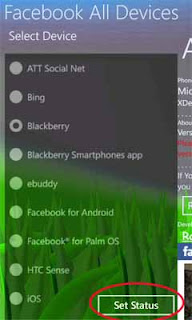
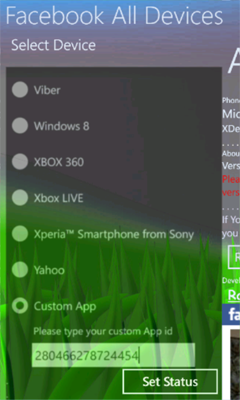
In first page it will show to list of devices. Select any device and press Set Status button,


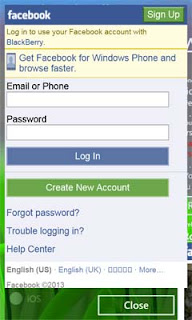
 Now a white screen will appear after few seconds it will show Facebook login screen(Depends on speed of internet connection),


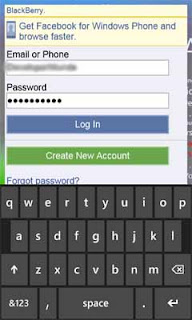
 Login here.

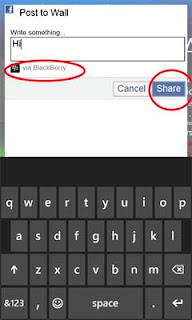
after login it will show you option to update Facebook status from via that device which you have selected. Now write anything which you want to share, and click on Share button, 


after it will show following screen


Now click on Close button. You have finish it.
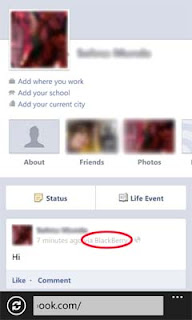
Now you can check it. Open Facebook in web browser or any another Facebook application, now you will see that your status has been updated from that device which you did select. :)


You can also update Facebook status from another devices which are not available in application. For this scroll down and select Custom Device and type id of that device in textbox. For example if you want to update your facebook status from Nokia 3310 XpressMusic Slide™: then you need to type its id, which is 280466278724454
after that you click on Set Status button and follow same steps. Click here for list of some custom device names and their ids.

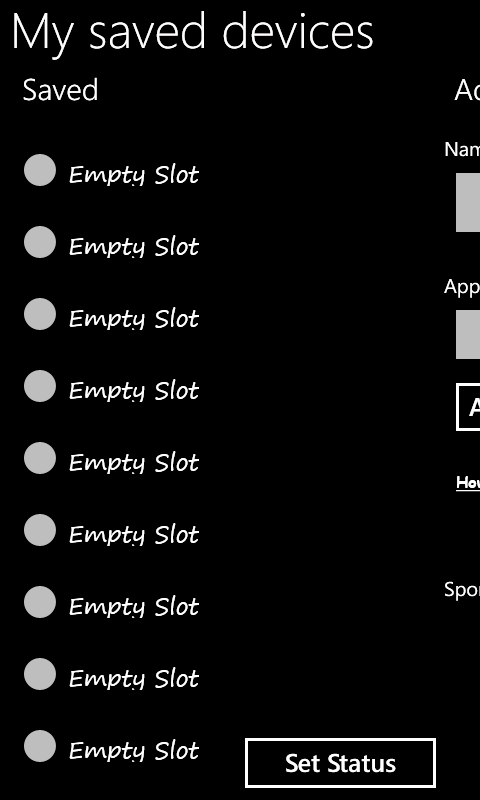
It is very difficult to type each time application ID, so in latest version (#2 FBAD v:1.0.0.1 and newer) we have addead a new option named My Saved Devices

In this you can save upto 10 IDs.

In My saved Devices scroll right
here type Name and Application ID (Name is just used for identify only, it don't effect. But type application ID correctly)
Click on Add button, A message box will show and press Ok. Now scroll left, here you will se that your new entry have saved.
Select you new Application and press Set Status button, And it will work like default saved application.

How to Logout
After update status it will redirect to home page of mobile version. If you want to logout then scroll down and click on Logout


How to Create a Application for use in this application
It is very easy to create a application. Click here to visit tutorial of create application of Facebook for #2 FBAD


Click here for download for Windows Phone


If you want to add any another device(s) in this application then you can tell to me, You can comment here or contact with me on Facebook. My contact details are available in this application under 'About' section. I'll add them. Waiting for your feedback.